Get AirBeam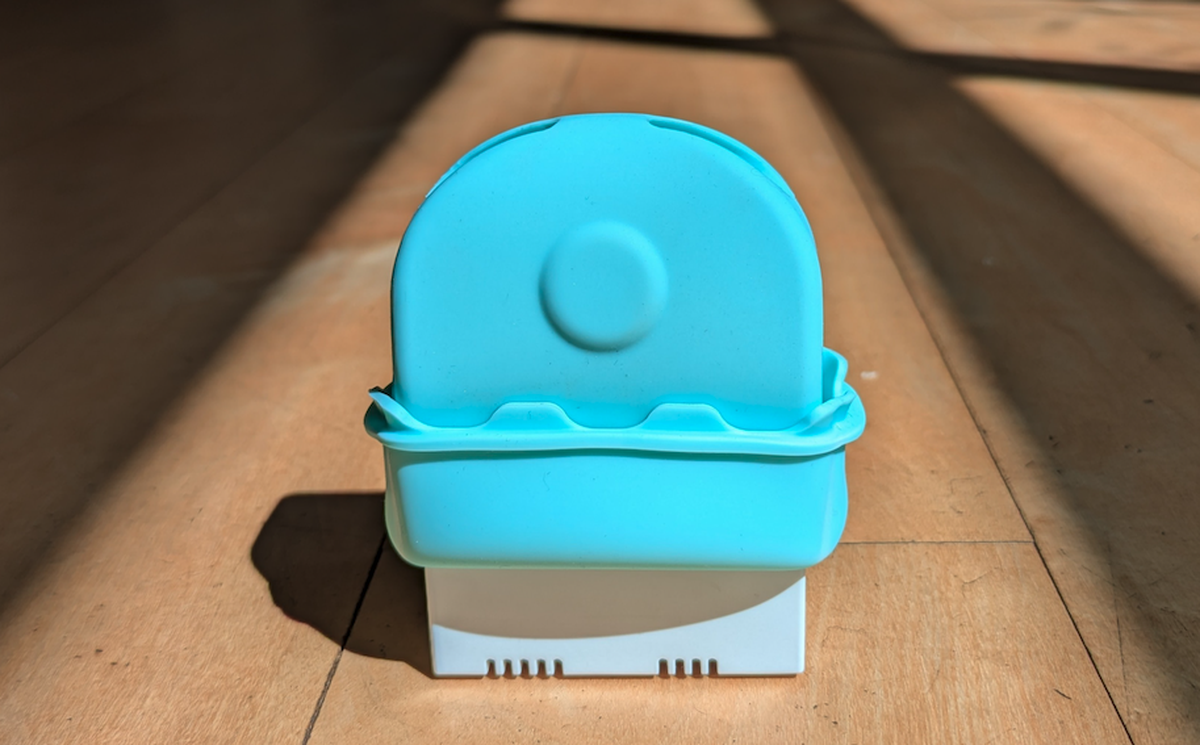
First launched in 2014, HabitatMap’s AirBeam air quality monitor has evolved over more than a decade and four models to become more reliable, more accurate, more versatile, more portable, and more rugged. The latest improvements to the AirBeam are a direct result of constructive feedback from thousands of people located all around the world using AirBeams for everything from clean air advocacy campaigns to classroom education to medical research.
Here’s what’s new with AirBeam Mini . . .
Rubber Sleeve
We changed the material used in AirBeam Mini’s rubber sleeve from TPU to silicon. The silicon sleeve does an equally good job of protecting the AirBeam from drops and raindrops while also being simpler to remove from the enclosure and providing for easier actuation of the power button with better tactile feedback.
Firmware Update
We updated the AirBeam Mini firmware to allow users to select the sampling interval, improve battery runtime, increase storage, make data collection more reliable, and improve accuracy. This firmware upgrade is also available to everyone who owns an older model AirBeam Mini. Instructions for updating your AirBeam Mini firmware are provided at the bottom of this post. Firmware development was led by Sebastian Strycharz of Lunar Logic who wrote the code from the ground up using the Rust programming language. The AirBeam Mini firmware is open source (as is all the code for the AirCasting Android, iOS, and web apps) and available online at GitHub.
Sampling Interval & Improved Battery Runtime
Users can set the sampling interval for mobile AirBeam Mini sessions to 1-second, 5-seconds, 1-minute, 5-minutes, or 10-minutes. When the sampling interval is set to 1-minute or less, AirBeam Mini samples every second, outputs an integrated average for the entire sampling period, and can run for 20 hours on a fully charged battery. When the sampling interval is set to 5-minutes, AirBeam Mini partially powers down for the first minutes, powers up to sample every second of the final minute, outputs an integrated average for the final minute of the sampling interval, and can run for 30 hours on a fully charged battery. The sampling logic is the same when the sampling interval is set to 10-minutes and the AirBeam can run for 33 hours on a fully charged battery.
Storage
By economizing on how data is written to storage and implementing the sampling interval feature, AirBeam Mini can now store 1,675 days of 10-minute interval data, 837 days of 5-minute interval data, 167 days of 1-minute interval data, 14 days of 5-second interval data, or 67 hours of 1-second interval data.
Reliable Data Collection
Some phone and operating system combinations are aggressive about terminating the Bluetooth connection between the AirBeam and the AirCasting app when recording long mobile sessions, particularly when the AirCasting app is recording in the background. Previously this could result in lost data. The new AirBeam Mini firmware - working in conjunction with the updated AirCasting Android and iOS apps - fixes this problem by implementing an auto-reconnect and data sync feature. Now if the Bluetooth connection between the AirBeam and AirCasting app is terminated, the connection is restored automatically and all the data stored to the AirBeam Mini while it was disconnected is synced to the AirCasting app upon reconnection. So no more lost data.
Improved Accuracy
For 18 weeks we collocated AirBeam Minis at the New York State Department of Environmental Conservation’s “Queens College” air quality monitoring site next to their Teledyne API Model T640, a highly accurate Federal Equivalent Method monitor that measures PM2.5. Dr. Chris Lim – a professor of Environmental Health Sciences at University of Arizona with expertise in the application of low-cost sensor technologies for personal exposure assessment – developed custom calibration equations for AirBeam Mini based on the intercomparison. Dr. Lim’s report, which discusses his approach to calibrating AirBeam Mini using the intercomparison data, is available for download here. Based on the data collected and the methods used to develop the calibration equations, the new AirBeam Mini is the most accurate AirBeam model to date and best in class when it comes to accuracy among low-cost air quality instruments measuring particulate matter.
Update AirBeam Mini Firmware
Have an older model AirBeam Mini that was purchased by or before May 2026? You can update to the latest firmware and take advantage of all the latest improvements. Step-by-step instructions are posted below.
- Download the AirBeam Mini firmware BIN file here.
- Using a Chrome web browser, navigate to https://espressif.github.io/esptool-js/.
- Using the cable that shipped with your AirBeam Mini (or another compatible USB cable that supports data transfers) connect your AirBeam to your computer.
- Set the “Baudrate” to “921600”, click “connect”, turn on your AirBeam Mini and select the port associated with the AirBeam Mini. The port will appear on the list and disappear from the list as you power the AirBeam on and off. The proper port to select begins “USB JTAG…”
- Set the “Flash Address” to “0x0”, then click “choose file” and select the AirBeam Mini firmware BIN file you downloaded in step 1.
- Click “Program” and wait 15-20 seconds until the serial output displayed in the black box reads “Hard resetting via RTS pin…”, then turn your AirBeam off.
You have now successfully reprogrammed your AirBeam Mini, upgrading to the latest firmware. The simplest way to check if the firmware update was successful is to configure your AirBeam Mini to record a mobile session. During configuration, when you see an option to select the sampling interval, you’ll know you’ve unlocked all the new features and improvements delivered by the firmware upgrade.